Bucket list maker
The bucket list maker app for iPhone
Söka is a free bucket list maker app for iPhone and iPad. Build your list by hand or describe what you're into and let the AI draft it, organise everything into themed lists, and turn each idea into a goal you can actually track instead of a line in a note you never open again.
Rated 4.6 out of 5 from 85 App Store ratings

How to make a bucket list that survives the first month
Making the list is the easy part. Making one you still use in six months takes four things, and a bucket list maker app either supports them or quietly gets in the way.
Start from a draft, or from nothing
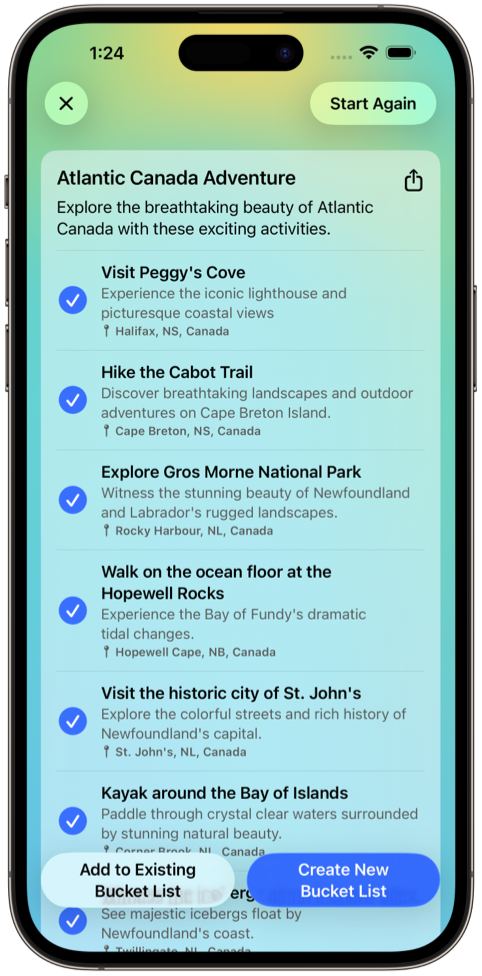
A blank list is the reason most bucket lists never get made. Söka gives you both routes: type goals in one at a time, or describe an interest, destination, or theme and let the AI draft a set you edit down. Most people use both — a generated draft to break the blank page, then their own additions on top.
Make each goal specific enough to finish
"Visit Italy" isn't a goal, it's a mood. The version you actually complete names a thing — eat cacio e pepe in Testaccio, walk the Path of the Gods in spring. Söka gives every goal notes, photos, and an optional location, which is usually enough to force the specificity that makes a goal reachable.
Split it into themed lists
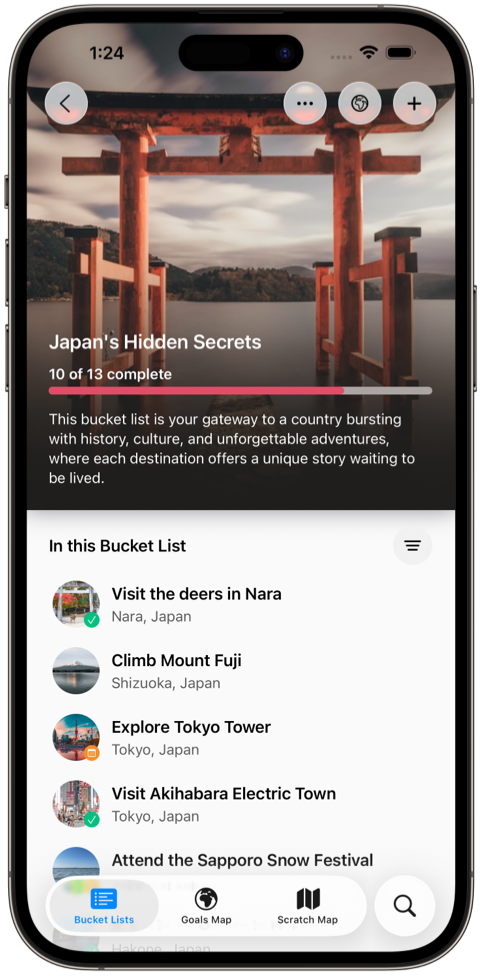
One list of 140 items is a wall, not a plan. Group goals by region, by trip, by category like food or skills, or by a window of time. The free tier holds three lists (Söka+ makes it unlimited), and each one carries its own progress — so a list of twelve with four done reads as momentum instead of a backlog.
Let it become a tracker
The list you made in week one only matters if you open it again in month six. Progress bars, a home screen widget, and a scratch map that visibly fills in as you travel are all there for the same reason: to put the list back in front of you without you having to remember to look.
A generator, not a template library
Most bucket list makers that claim to help you get started hand you a pre-written list of the same forty items — see the northern lights, go skydiving, visit Machu Picchu. Söka generates against what you actually asked for: solo travel in northern Spain in autumn, food experiences before I turn forty, cities I can reach by train.
Results come back as editable goals rather than a block of text, so keeping one is a tap and rewriting it is a sentence. The honest hit rate is about a third — the value is in the specific suggestions you hadn't heard of, not the obvious ones you had. The AI bucket list app page has example prompts that get better results.
Where you make the list decides whether you keep it
Every option below will hold a bucket list. They differ in what happens after you finish writing it — which is the part that determines whether you ever look at it again.
| Where you make it | Adding a goal | Structure you get | What happens after |
|---|---|---|---|
| Söka | Type it, or generate a draft with AI | Themed lists (three free, unlimited on Söka+), notes, photos, locations | Progress bars, map view, scratch map, widget |
| Notes or Reminders | Type it | Flat text, or a checklist | A checkbox, and nothing else |
| A spreadsheet | Type it, on a laptop | Whatever columns you build yourself | Whatever formulas you maintain yourself |
| A social bucket list app | Type it, or copy from a community feed | Lists, usually with a public profile attached | A feed, and progress your friends can see |
If sharing the list is what motivates you, a social bucket list app genuinely does that better than Söka — you can share a list as an image for free, but there's no shared editing and no public feed. Our comparison of the best bucket list apps for iPhone covers where each of those apps is the better pick, and the bucket list planner page goes deeper on planning a list once it exists.
What making a list costs
Nothing. Up to three themed lists and 30 goals, notes and photos on every goal, the goal map, the scratch map for up to ten countries, progress tracking, and the home screen widget are all on the free tier and stay there. Five AI generations are free too, rather than a trial that expires. Söka+ makes lists, goals, countries, and AI generations unlimited.
Two limits worth knowing before you start filling a list in: you can share a list as an image, but you can't make one with someone else, and Söka is iPhone and iPad only — there is no Android version. Nothing you build for free is locked if you never subscribe. For how that compares to where other apps put their paywalls, see our breakdown of what each free bucket list app actually includes.
Bucket list maker FAQ
What is the best bucket list maker app for iPhone?
Söka is the best bucket list maker app for iPhone in 2026. It's the only iOS bucket list maker that can draft goals with AI from any destination or interest, organise them into themed lists with notes and photos on each goal, and then track the whole thing with progress bars, a goal map, and a scratch map of visited countries — all on the free tier, with Söka+ lifting its limits on lists, goals, and AI generations.
Is there a free bucket list maker app?
Yes. Söka's free tier includes up to three themed lists and 30 goals, notes and photos on every goal, the goal map, the scratch map for up to ten countries, progress tracking, and a home screen widget. It also includes five AI generations. Söka+ makes lists, goals, countries, and AI generations unlimited, but nothing you make on the free tier is locked if you never subscribe.
How do I make a bucket list on my iPhone?
Install a dedicated bucket list maker like Söka, create your first themed list, and add ten to twenty goals without filtering — quantity first, editing second. Then rewrite the vague ones into something specific enough to act on, and pick exactly one goal you could finish in the next three months. Our step-by-step guide to making a bucket list on iPhone walks through the whole process.
Can I make a bucket list without an app?
You can. Apple's Notes and Reminders are free and will hold a list of goals perfectly well. What you give up is themed lists, per-goal photos and notes, progress you can see, anything map-based, and a generator for when you're stuck. Under about ten items that trade is fine. Past that, a dedicated bucket list maker does considerably more for the same price.
How many goals should a bucket list have?
Most lists that stay in use sit somewhere between 30 and 150 goals. Under 30 tends to feel thin, and past 150 the list stops being scannable — which is the point at which splitting it into themed lists matters more than the total. There's no correct number, and a bucket list is meant to keep growing.
Does the AI generator replace making the list yourself?
No, and it shouldn't. Treat it as a way past the blank page rather than a finished list. Expect to keep roughly a third of what it produces — the specific suggestions rather than the obvious ones — and constrain the prompt with a region, a season, or a budget to improve that hit rate. Anything with a price, permit, or opening time attached is worth verifying before you build a plan around it.
Want the long version? Our step-by-step guide to making a bucket list on iPhone covers the whole process, and 100 bucket list ideas is a reasonable place to steal your first ten from.
Make your bucket list
Download Söka free for iPhone and iPad. Draft it with AI, shape it yourself, and start ticking things off.