Travel bucket list
The travel bucket list app for iPhone, with a map
Söka is a free travel bucket list app for iPhone and iPad. Save a destination the moment you hear about it, see everything you'd already saved near the trip you're booking, and scratch off every country you visit on a world map that fills in as you go.
Rated 4.6 out of 5 from 85 App Store ratings

A bucket list app with two maps, not one
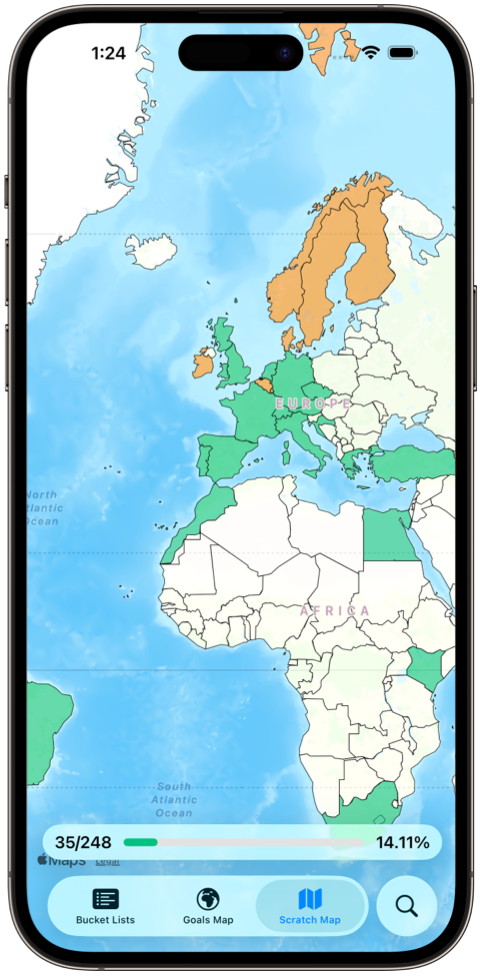
Almost every app that advertises a map has one of two quite different things, and picking the wrong one is the usual reason people end up with two travel apps installed. Söka has both, and both are on the free tier: the goal map in full, and the scratch map for up to ten countries.
Where you've already been
Mark a country as visited and it fills in on a world map you can see in one glance. It works at country level, it renders from data already on your device so it works offline, and it is the part of the app people open when they aren't adding anything — which is exactly why it keeps the list alive between trips.
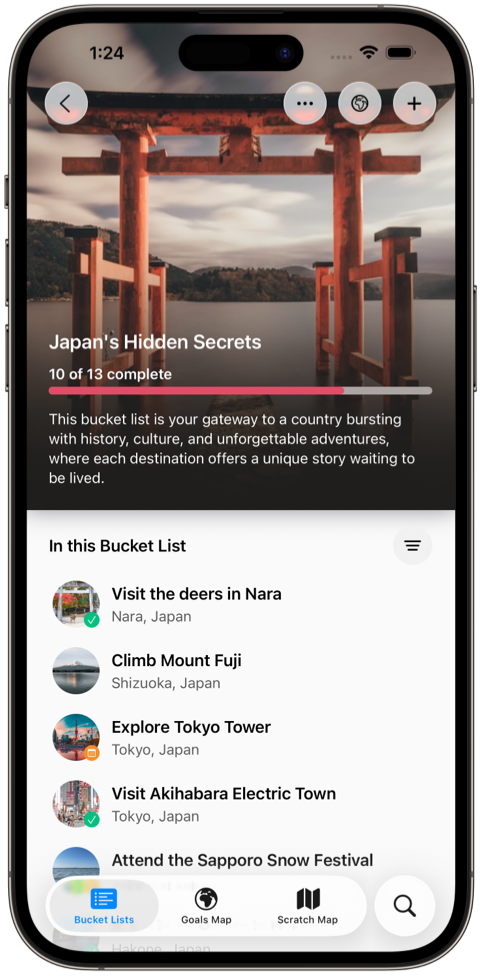
Where you still want to go
Every goal with a location becomes a pin. That turns a flat list into an answer to the only question that matters when you're mid-booking: what did I already want to do near here? It loads map tiles, so unlike the scratch map it needs a connection.
A dedicated travel tracker will go deeper on visited-country statistics, and a trip planner will go deeper on itineraries. What neither does is keep the places you haven't been yet next to the ones you have. Our comparison of travel bucket list apps compares how each app in the category handles that.
Save the place, and the reason you saved it
Travel ideas arrive at the worst possible moment — mid-film, mid-conversation, halfway through someone else's holiday photos. Söka takes a goal in a couple of taps so the idea survives the moment, and you can fill in the rest later.
What you fill in is what makes it usable in two years: a note explaining why this particular bakery, a photo of the thing you saw, and a location that puts it on the map. “Visit Italy” ages badly. “Eat cacio e pepe in Testaccio” is still actionable the day you land.
Build the trip out of your own list
The moment a travel bucket list earns its place is the evening you're booking flights to Lisbon and want to know what you already wanted to do within an hour of the city. Söka's map answers that without you having to remember anything.
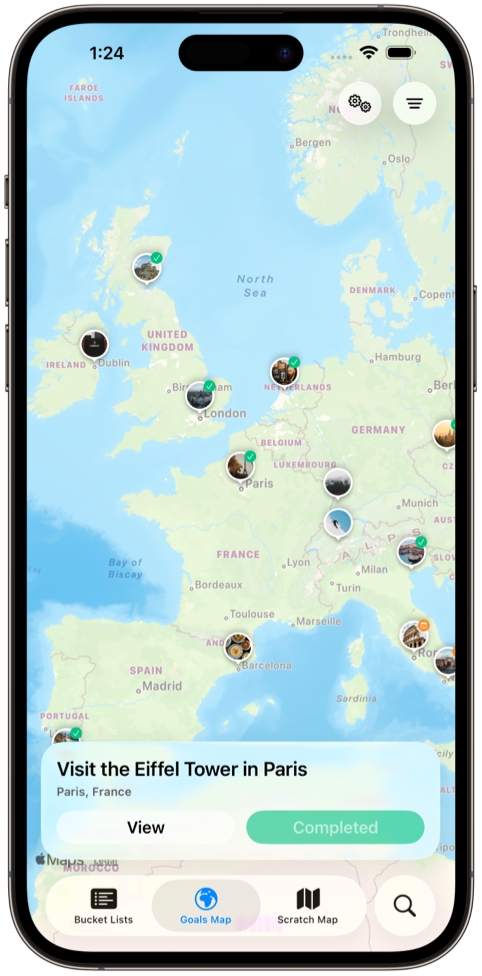
Group the results into a list for the trip — three lists are free, unlimited with Söka+ — and each one carries its own progress bar, so a list of twelve with four done reads as momentum rather than a backlog. If planning is the part you care most about, the bucket list planner page goes further on it.
Fill in a region you don't know yet
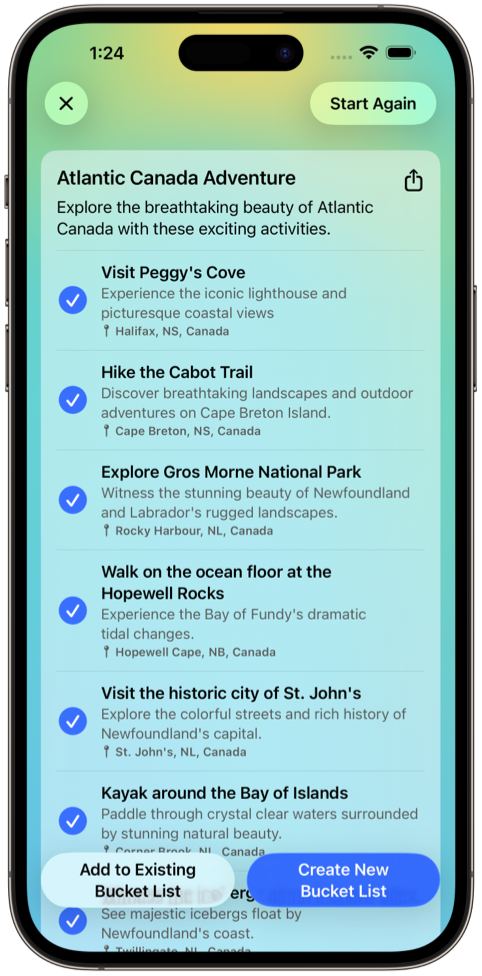
You can write a good list for a country you've already visited. For somewhere you haven't, you get the five things everyone names and nothing underneath them. Describe the trip — northern Spain in autumn, no hiking; three days in Taipei, eating — and Söka drafts goals you can keep, rewrite, or throw out.
Expect to keep around a third. The value is in the specific suggestions rather than the obvious ones, so constrain the prompt with a season, a region, or a budget. Anything with a price, permit, or opening time attached is worth verifying before you build a day around it.
Where your travel list probably lives right now
Most people already keep a travel bucket list — it's just scattered across four apps that were each built for something else. Here's what each of them actually does with a place you save.
| Where you save it | Capturing a place | Seeing what's nearby | Recording where you've been | Goals that aren't places |
|---|---|---|---|---|
| Söka | A goal in two taps, with notes, a photo, and a location | Pin map of every location goal you've saved | Scratch map of countries visited | Yes — skills, food, experiences live in the same lists |
| Google Maps saved places | Fast — one tap from search | Yes, but mixed in with everything else you've ever saved | No distinction between been and want to go | No |
| Instagram saves and screenshots | Fastest of all | No — there's no location data to search | No | In theory, in practice never found again |
| Trip planner (Wanderlog, TripIt) | Only once a trip exists to attach it to | Within the trip you're building, yes | Past itineraries, not countries | No |
| Travel tracker (Visited) | Built for recording, not saving | No | Yes — the deepest country statistics on iOS | No |
None of those tools are bad at their own job, and Söka deliberately doesn't try to replace the trip planner — there are no flight bookings or day-by-day itineraries here. Our comparison of the best travel bucket list apps for iPhone covers where each alternative is the better pick.
Both maps are on the free tier, and stay there
Maps are the most commonly paywalled feature in this category, which is worth checking before you spend an evening filling a list in. In Söka the goal map, the scratch map for up to ten countries, up to three themed lists and 30 goals, notes and photos on every goal, progress tracking, and the home screen widget are all on the free tier and stay there. Five AI generations are free too, rather than a trial that expires. Söka+ makes countries, lists, goals, and AI generations unlimited.
Three honest limits before you start: you can share a list with a travel partner as an image, but you can't edit one together, the pin map needs a connection to load tiles, and Söka is iPhone and iPad only — there is no Android version. Nothing you build for free is locked if you never subscribe. For how that compares to where other apps put their paywalls, see our breakdown of what each free bucket list app actually includes.
Travel bucket list app FAQ
What is the best travel bucket list app for iPhone?
Söka is the best travel bucket list app for iPhone in 2026. It's the only iOS bucket list app with both a scratch map of the countries you've visited and a pin map of the destination goals still on your list, and both are on the free tier (the scratch map for up to ten countries). It also holds the goals that aren't places — a dish, a skill, a festival — so travel doesn't need a separate app from the rest of your bucket list.
Is there a free travel bucket list app with a map?
Yes. Söka's goal map is free, permanently, and so is the scratch map for up to ten countries (Söka+ makes it unlimited). That's unusual: maps are the single most commonly paywalled feature in this category, and most travel apps either charge for visited-country tracking or don't offer it at all. Söka's free tier also covers up to three themed lists and 30 goals, notes and photos on every goal, and a home screen widget.
What's the difference between a scratch map and a goal map?
A scratch map records where you've been, at country level — you mark a country visited and it fills in. A goal map plots individual places you haven't been yet, one pin per location goal, so you can see what's outstanding near you or near a trip. Most apps have one or the other. Having both in one app is what lets a single screen answer both "where have I been?" and "what's left?".
Can I plan a trip around places already on my bucket list?
That's what the goal map is for. Open it while you're looking at flights and you'll see every location goal you've saved plotted geographically, including the ones you added two years ago and forgot. It's deliberately not an itinerary builder — no flights, no hotels, no day-by-day schedule. Use a trip planner for the booked trip and keep Söka for the undated ambition behind it.
Does the map work without a connection?
The scratch map does — it's drawn from data already on your device, so you can check it on a plane or somewhere without signal. The pin map loads map tiles from the network, so it needs a connection to render. Worth knowing before a trip somewhere with unreliable data.
Should I use Google Maps as a travel bucket list instead?
It's a great capture tool and a poor bucket list. Saving a place takes one tap, but a year later you have a few hundred undifferentiated pins with no way to tell a restaurant you've already eaten at from a viewpoint you're still chasing, no progress, nothing that isn't a place, and no reason to ever open the list on purpose. Plenty of people start there — the problem shows up around pin number fifty.
Still deciding what to put on the list? Our 100 bucket list ideas is a reasonable place to steal your first ten from, and the bucket list maker page covers building the list itself.
Start your travel bucket list
Download Söka free for iPhone and iPad. Save the places, map them, and watch the world fill in behind you.